- A Container That Observes Its Children
- Two Ways to Identify Interactive Elements
- Capturing Values Alongside Metadata
- Component Events and Interaction State
- Inside the TypeScript Implementation
- Native-Feeling Designer Integration
- Where InteractionDetails Fits
- Engineering Decisions and Lessons
- Extending Perspective Without Replacing Its Workflow
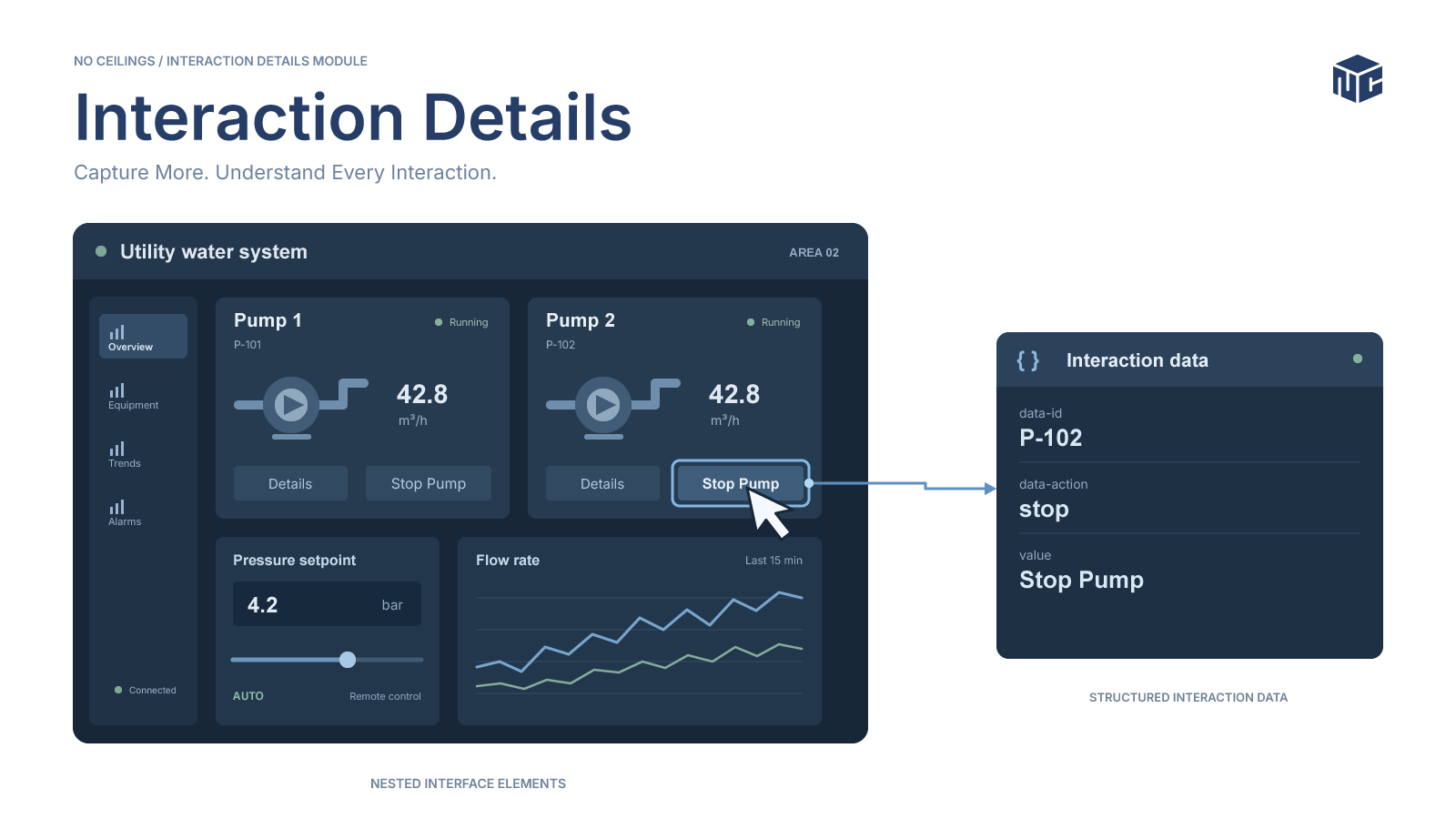
Ignition Perspective provides a visual development environment for building industrial HMIs and web-based applications. Its component library handles much of the underlying web development complexity, allowing developers to focus on application behavior rather than implementing every interface element from scratch.
For more sophisticated interfaces, an event alone may not tell the full story. A click identifies an action, but applications often also need to know which element initiated it, what that element represents, and what value was present at the time. Gathering that context consistently across nested components can introduce repetitive logic and tightly coupled event scripts.
At No Ceilings, we developed InteractionDetails, a custom Ignition Perspective container that combines familiar Flex layout behavior with configurable element matching, DOM attribute extraction, automatic value extraction, and optional interaction-state persistence. The goal was not to replace Perspective’s event model, but to make interaction context easier to capture and reuse.
The Problem: Interaction Context Is Often Fragmented
A typical Perspective screen may contain equipment cards, nested labels, icons, buttons, and status indicators. Different elements can participate in the same user action, yet the DOM target of a mouse event depends on exactly where the user interacts.
Without a shared extraction mechanism, developers may need to repeat identification and value-handling logic across components. InteractionDetails centralizes that work at a container boundary while leaving application-specific decisions to the consuming view.
A Container That Observes Its Children
InteractionDetails is a genuine Perspective container. Developers can place ordinary Perspective components inside it and arrange them using familiar Flex layout properties. When an interaction occurs, React event propagation allows the container to observe supported mouse events and examine the originating DOM element.
Rather than placing a transparent overlay over its children or installing listeners on every descendant, the container performs interaction extraction at its root. This avoids intercepting pointer input and eliminates the need for a per-child listener registry.
Why the Container Approach Matters
The component renders its children as normal Perspective components. It does not add a pointer-blocking layer, so nested controls remain available for their usual interactions. The container observes supported React mouse events as they reach its root.
This architecture keeps extraction logic in one place, but it does not guarantee that every descendant event will arrive: child handlers and event propagation behavior still matter.
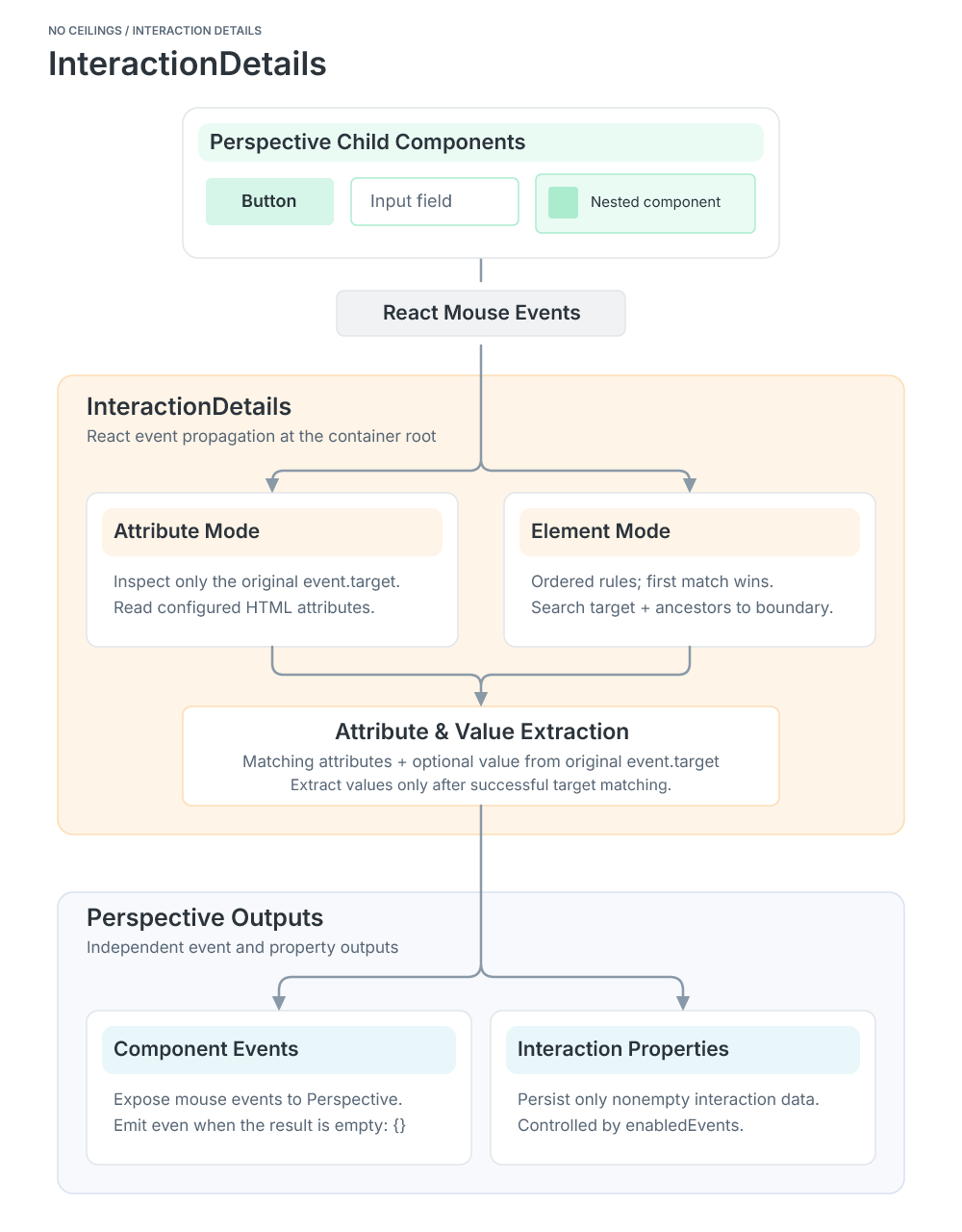
Interaction Processing Architecture
InteractionDetails captures mouse events from nested Perspective components, extracts target metadata and values, and exposes the results through events and optional properties.View Image
Two Ways to Identify Interactive Elements
The targetMode property selects one of two matching strategies. The default, attribute, examines only the originating event target. The element mode supports ordered matching rules and bounded ancestor traversal.
Choosing the Right Matching Strategy
The two modes serve different DOM structures. Attribute mode is best when the exact element receiving the event carries the desired metadata. Element mode is more suitable when a meaningful control contains nested text or icons and its identifying attributes belong to an ancestor.
Both strategies require a qualifying attribute match. A text value alone does not turn an unmatched event into a successful extraction.
Attribute Mode: Read the Event Target
With attribute mode, developers configure targetAttributes to identify the HTML attributes they want to capture. For example, a button can expose an identifier and action:
<button data-id="123" data-action="start">Start Pump</button>{
"targetMode": "attribute",
"targetAttributes": ["data-id", "data-action"]
}The extractor includes configured attributes whose getAttribute() results are not null. It does not search ancestors in this mode. If none of the configured attributes are found on the direct target, the result is an empty object.
Attribute Mode: Capturing Element Metadata
Attribute mode extracts configured HTML attributes directly from the element receiving the mouse interaction.View Image
Element Mode: Match Within Nested Structures
A button or graphical control may contain labels, icons, and other nested elements. Clicking one of those descendants can produce a different DOM event target from the element holding the useful metadata. Element mode addresses this with an ordered list of rules.
<button data-id="123" data-name="Pump 1" data-status="running">
  <span>Stop Pump</span>
</button>
[
{
"attribute": "data-id",
"value": "123",
"attributes": ["data-name", "data-status"]
}
]For each rule, InteractionDetails examines the original event target and walks upward until it finds an exact attribute/value match or reaches the container boundary. The first rule that matches wins. The identifying attribute is included automatically, while additional requested attributes are read from the matched element. Rule order matters: this is not a search for the globally closest match across all rules.
Element Mode: Identifying Nested Elements
Element mode follows configured matching rules to identify a parent element and capture its attributes when a nested element is clicked.View Image
Rule Priority and Container Boundaries
In element mode, rules are evaluated in their configured order. For each rule, traversal begins at the original event target and proceeds upward only as far as the InteractionDetails root. The first rule with an exact attribute/value match determines the result.
Because priority belongs to the rule list, a match found by an earlier rule can win even when a later rule would match an element closer to the original target. Ordering rules from most specific to most general can make the intended behavior easier to understand.
Capturing Values Alongside Metadata
For successfully matched interactions, InteractionDetails also attempts to extract a value from the original event target. This value is separate from the attributes obtained from a matched ancestor.
- Text inputs and textareas return their current text.
- Checkboxes and radio buttons return their checked state.
- Number and range inputs return a finite numeric value when available.
- Single-select controls return a selected value; multiple-select controls return an array of selected values.
- Other elements can return nonempty, trimmed text content.
For example, clicking the nested span in the button above can produce the following payload:
{
  "timestamp": "2026-10-20T06:00:00.000Z",
  "target": {
    "data-id": "123",
    "data-name": "Pump 1",
    "data-status": "running"
  },
  "value": "Stop Pump"
}
Value extraction is automatic and optional; no separate toggle is required. A matching interaction can still be valid when no meaningful value is available. These are snapshots captured during supported mouse events, not dedicated onChange or onInput notifications, and the component does not infer Perspective component property values.
Understanding Where the Value Comes From
In element mode, the extracted metadata and extracted value can come from different DOM nodes. Attributes belong to the matched element, while value comes from the original event target. For a nested label inside a button, this can produce the button’s identifier alongside the label’s text.
The resulting payload describes the interaction at that moment. It should not be treated as a live binding to the underlying Perspective component or as a substitute for dedicated input-change handling.
Component Events and Interaction State
InteractionDetails handles nine React mouse events: onClick, onDoubleClick, onMouseDown, onMouseEnter, onMouseLeave, onMouseMove, onMouseOver, onMouseOut, and onMouseUp.
Each interaction can produce two different outputs. Component events are transient notifications emitted even when extraction produces {}. Interaction state is optional: the enabledEvents flags determine which nonempty payloads are persisted under the corresponding key of the interactions property.
Transient Notifications Versus Stored Results
Component events are dispatched for supported mouse events even when no target attributes match and the extraction result is {}. This allows an event handler to observe an interaction without assuming that meaningful metadata was extracted.
Persistence follows a narrower rule: the corresponding enabledEvents flag must be true, and the extracted payload must be nonempty. The flags default to false. Each enabled event type can retain its latest qualifying payload in interactions.
{
  "enabledEvents": {
    "onClick": true,
    "onDoubleClick": false,
    "onMouseDown": false,
    "onMouseEnter": false,
    "onMouseLeave": false,
    "onMouseMove": false,
    "onMouseOver": false,
    "onMouseOut": false,
    "onMouseUp": false
  }
}
This separation lets developers respond to events, bind application logic to stored interaction metadata, or use both. Extraction occurs in the browser, but Perspective property synchronization and configured gateway-side scripts can still involve gateway communication. We have not measured a performance advantage or established that this eliminates network round trips.
Designing Around Event Frequency
Not every mouse event has the same operational significance. A click may represent a deliberate selection, while mouse movement can occur repeatedly during ordinary navigation. Choosing which events to persist helps keep the stored interaction state focused on information the application actually needs.
The component provides the event and state mechanisms; downstream scripts, bindings, and gateway communication depend on how the consuming application uses them. No benchmark or network-traffic reduction is implied by this design.
Inside the TypeScript Implementation
The browser implementation separates matching and value extraction in interactions.ts from event handling, rendering, and Perspective property writes in InteractionDetails.tsx. The following is an actual excerpt from the module’s getElementValue() function:
export function getElementValue(element: Element): InteractionValue | undefined {
    if (element instanceof HTMLInputElement) {
        if (element.type === "checkbox" || element.type === "radio") {
            return element.checked;
        }
        if (element.type === "number" || element.type === "range") {
            const number = element.valueAsNumber;
            return Number.isFinite(number) ? number : undefined;
        }
        return element.value;
    }
    if (element instanceof HTMLTextAreaElement) {
        return element.value;
    }
    if (element instanceof HTMLSelectElement) {
        return element.multiple
            ? Array.from(element.selectedOptions).map(option => option.value)
            : element.value;
    }
    return element.textContent?.trim() || undefined;
}
The extractor returns an optional value rather than inventing one. That behavior is particularly useful when the matched target provides meaningful attributes but the clicked element has no text or input value.
Separation of Responsibilities
The extraction helper determines whether a target qualifies and what data can be read. The React component manages mouse handlers, child rendering, Perspective event dispatch, and optional property updates. This division makes the behavior easier to reason about than a single component that mixes matching rules with rendering and state writes.
The Java descriptor and JSON resources provide registration, property definitions, event descriptors, and layout defaults. Keeping these responsibilities separate also makes the component’s Designer configuration more predictable.
Native-Feeling Designer Integration
The container retains familiar Flex layout settings including direction, wrap, justify, alignItems, and alignContent. Children support grow, shrink, basis, and display. It also supports deep selection and normal child insertion in the Perspective Designer.
The property schema uses conditional visibility to show targetAttributes in attribute mode or targetElements in element mode. Java registration, JSON property and event schemas, and TypeScript runtime behavior are maintained as separate responsibilities.
Configuring InteractionDetails in Perspective Designer
InteractionDetails integrates with the Perspective Designer as a Flex container with configurable target matching and interaction properties.View Image
Configuration That Adapts to the Selected Mode
Conditional property visibility keeps the Designer focused on the active extraction strategy: targetAttributes appears for attribute mode, and targetElements appears for element mode. The inactive configuration is not used by the runtime.
The child layout retains familiar Flex behavior, including grow, shrink, basis, and display controls. This makes InteractionDetails useful as a layout container in its own right, rather than a separate utility that developers must place around an existing interface.
Where InteractionDetails Fits
InteractionDetails does not prescribe what happens after an interaction. It provides context that the consuming Perspective application can interpret. Potential uses include equipment selection, interactive diagrams, dynamic navigation, custom controls, and development or diagnostic interfaces. These are application possibilities, not claims of completed deployments.
Potential Application Patterns
Equipment selection: associate a clicked visual element with an equipment identifier and descriptive attributes, leaving the view to decide whether to open details or update a selection.
Interactive diagrams: match a labeled ancestor when a user clicks an icon or text node within a larger control.
Diagnostics and development: inspect the most recent qualifying interaction by event type, or handle transient event payloads directly when state retention is unnecessary.
These examples illustrate possible integration patterns rather than verified deployments or packaged application features.
Engineering Decisions and Lessons
Several decisions shaped the component: use event propagation instead of an overlay; keep direct-target matching distinct from ancestor matching; extract values from the original event target; separate transient events from optional state; and keep runtime behavior, registration, and configuration in their appropriate layers.
The current implementation also has deliberate boundaries. Descendant handlers may affect event propagation. The component does not listen for input-change events, and React mouse-enter and mouse-leave semantics should not be assumed identical to native bubbling events.
Boundaries Worth Keeping in Mind
InteractionDetails handles mouse events, not a general-purpose stream of keyboard, touch, input, or change notifications. Event propagation can be affected by descendant handlers, and the semantics of React mouse-enter and mouse-leave events should not be confused with native DOM bubbling behavior.
The container reads attributes and values from DOM elements as rendered in the browser. Its output should therefore be treated as interaction context, not as an authoritative source of equipment state or a substitute for application-level validation.
Extending Perspective Without Replacing Its Workflow
InteractionDetails brings configurable element-level interaction context into Perspective while preserving familiar container and Designer behavior. With two target-matching strategies, automatic value extraction, nine supported mouse events, and optional interaction-state persistence, it provides a reusable foundation for more context-aware industrial interfaces.
For No Ceilings, the project reflects a practical engineering approach: extend the capabilities of an existing platform, separate concerns clearly, and build reusable tools that can serve more than one application.