At No Ceilings, we develop Dynamic Reporting solutions that transform industrial and operational data into structured, automated, and accessible reports. Using Ignition by Inductive Automation as our primary reporting platform, we help organizations reduce manual reporting tasks and provide consistent information to engineering, maintenance, production, and management teams.
Whether you are preparing daily production summaries, reviewing equipment downtime, documenting process conditions, or consolidating information from multiple systems, we design reporting solutions around your infrastructure and operational requirements.
Industrial Reporting with Ignition
Industrial facilities generate operational data through programmable logic controllers (PLCs), supervisory control and data acquisition (SCADA) systems, historians, databases, and business applications. Turning this information into useful reports often requires manual collection and formatting.
The Ignition Reporting Module provides tools for designing, generating, and distributing reports using connected data sources. We use these capabilities to build reporting workflows tailored to the information each team needs.
- Scheduled Reporting: Generate hourly, daily, weekly, or monthly summaries automatically.
- Event-Driven Reporting: Generate reports in response to application logic or operational events.
- Parameterized Reports: Select equipment, production lines, dates, or other criteria.
- Historical Data Reporting: Organize stored process values and operational records into readable reports.
- Custom Report Layouts: Present tables, charts, calculations, and formatted information.
- Automated Distribution: Configure supported delivery methods, including email and file-based workflows.
These capabilities can replace repetitive spreadsheet preparation with repeatable reporting processes that are easier to maintain as requirements change.
Connecting Reporting to Operational Data
Useful reports depend on accurate, accessible data and consistent calculations. Our IT/OT integration experience helps us connect reporting applications to existing operational systems rather than creating another isolated source of information.
- Industrial Control Systems: Equipment status, production counts, and process measurements.
- SCADA and Historian Systems: Historical values, alarms, and operational events.
- SQL Databases: Production records, equipment information, and maintenance data.
- Manufacturing Applications: Information from MES, quality, and production management systems.
- Enterprise Systems and APIs: Additional data available through supported interfaces.
For example, a production report may combine equipment runtime recorded by SCADA, quantities stored in SQL, and product information from a manufacturing application. The result is a consolidated view without manually gathering data from each system.
Reporting Applications and Examples
Different teams need different views of the same operation. We develop reports with the appropriate calculations, reporting periods, and level of detail for each application.
Production and Shift Reporting
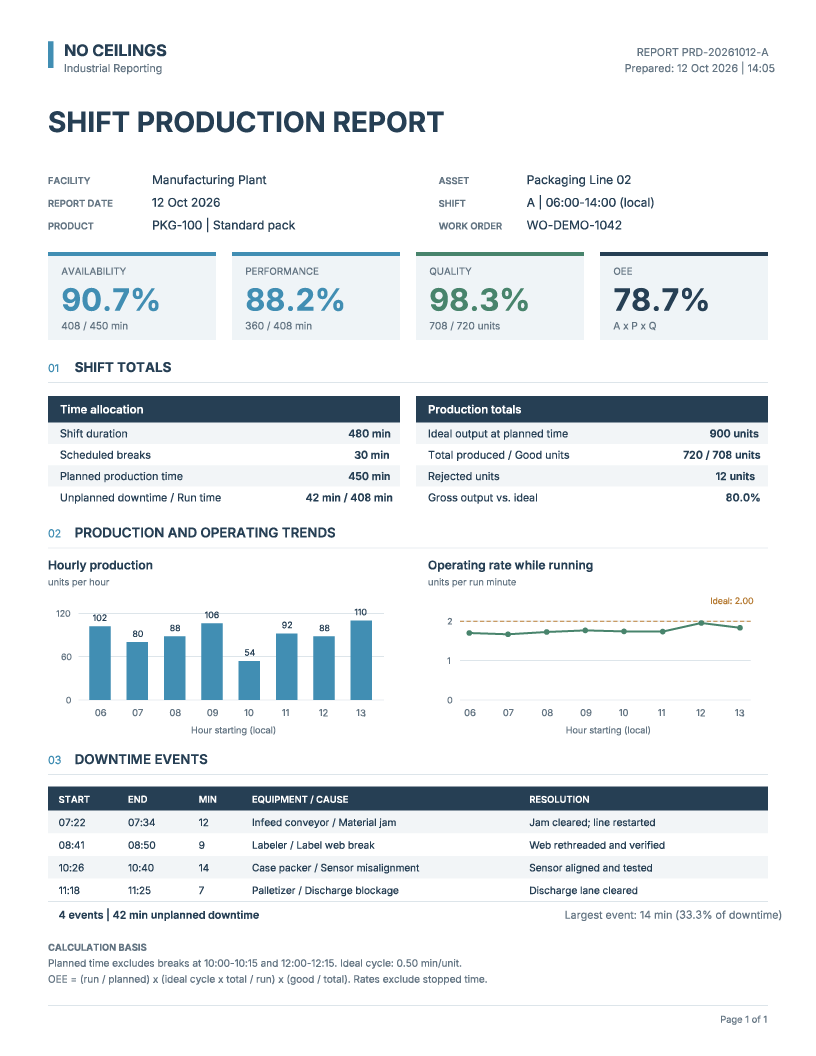
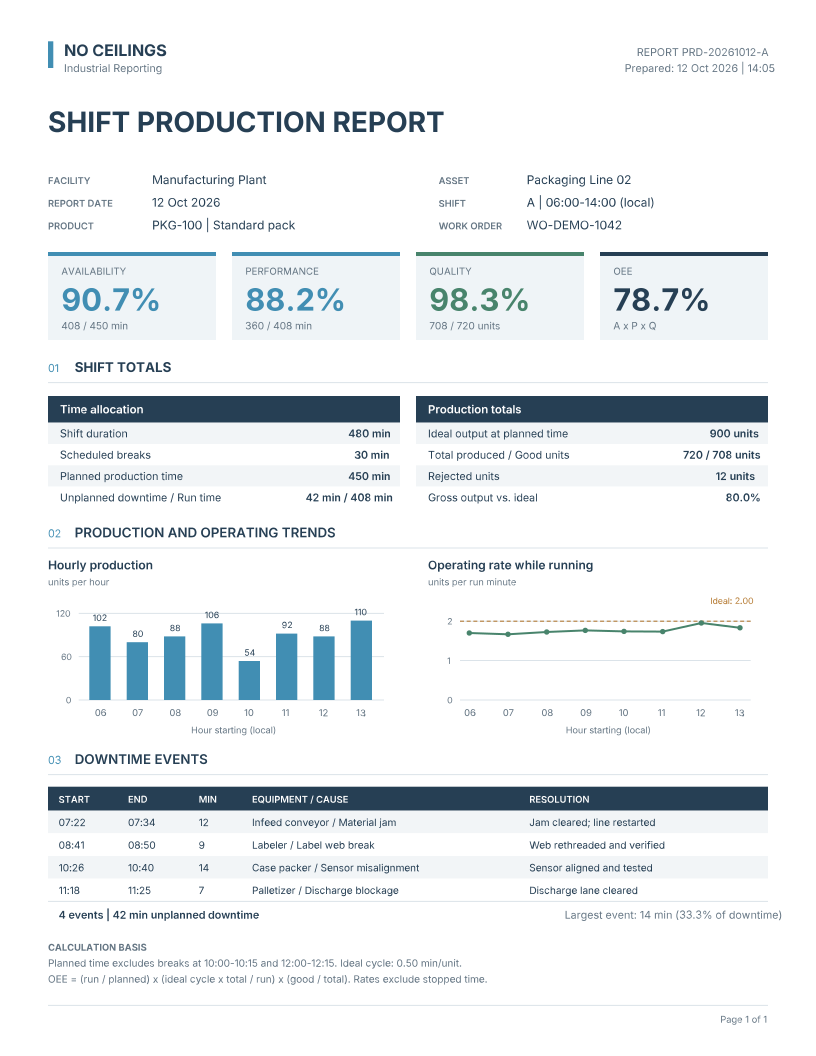
Production reports help operators, supervisors, and management review manufacturing activity by shift, line, product, or facility. Typical information includes production totals, throughput, downtime, product or batch information, and performance indicators.
The illustrative shift production report below demonstrates how availability, performance, quality, overall equipment effectiveness (OEE), hourly trends, and downtime events can be presented together.
Example Report
View the illustrative shift production report (PDF)Equipment Performance and Downtime Reporting
Historical reporting helps maintenance and engineering teams investigate recurring interruptions, evaluate operating patterns, and review equipment reliability. Reports can include runtime, downtime duration, alarm occurrences, operating cycles, and performance metrics. Where the necessary source data exists, calculations may include mean time between failures (MTBF) and mean time to repair (MTTR).
Process and Historical Data Reporting
Historical reports can document process measurements, batch conditions, equipment operating parameters, and utility consumption. Tables, charts, and summaries support troubleshooting, process reviews, and operational recordkeeping.
Automated Operational Summaries
Recurring reporting workflows can consolidate production totals, equipment downtime, and significant events into a consistent document for engineering or management review, then generate and distribute it according to configured schedules.
Integrating Data for Ignition Reporting
Not all operational information is readily available within a single system. Production records, equipment history, maintenance information, and business data may be distributed across databases, industrial applications, and enterprise platforms.
At No Ceilings, we use our software development and IT/OT integration experience to make this information accessible to Ignition’s Reporting Module. Depending on the existing infrastructure, this may involve SQL queries, application programming interfaces (APIs), custom scripts, middleware, or other integration technologies.
For example, a production report might require equipment runtime from Ignition, work order information from an enterprise application, and quality records from an external database. We can develop the necessary integrations to bring these datasets together and generate a consolidated report through Ignition.
Our focus is not limited to the reporting template itself. We consider the entire reporting workflow, from retrieving and preparing data to generating and distributing the final document. This allows us to develop reporting solutions that work with existing systems rather than requiring organizations to replace them.
Our Development Approach
1. Requirements and Discovery
We work with engineering, operations, maintenance, and IT teams to identify reporting objectives, users, data sources, calculations, and generation schedules.
2. Data Integration and Preparation
We develop the queries and integration logic required to retrieve reporting data, with attention to data quality, timestamps, reporting periods, and calculation consistency.
3. Report Design and Development
Using Ignition’s Reporting Module, we develop report templates with structured tables, historical charts, summaries, and calculated indicators. Where needed, we add parameters for equipment, facility, or reporting period selection.
4. Automation and Distribution
We configure report generation through schedules, user requests, or application events, and align delivery workflows with infrastructure and security requirements.
5. Validation and Deployment
We compare report outputs with source records, validate calculations and reporting periods, and test generation and delivery workflows before deployment.
Reporting Designed Around Your Operations
A production supervisor reviewing shift performance needs different information than a maintenance technician investigating faults or an engineer examining process history. Our experience across industrial automation, software development, and IT/OT integration helps us design reports around these real operational needs.
Rather than forcing every application into a generic template, we account for equipment configurations, data structures, workflows, and the way teams use the results.
Ready to Get Started?
Whether you are replacing manually prepared spreadsheets, automating production summaries, or consolidating reporting across multiple systems, No Ceilings can help you make operational data easier to use.
Request a quote to discuss your Dynamic Reporting requirements and how Ignition-based reporting and data integration can support your operations.